
Three years ago I audited a law firm site in Atlanta that was paying $4,800 a month for SEO. The agency had been working on the site for eighteen months. Rankings were flat. The firm partner wanted to know what was wrong.
I opened the site in Screaming Frog. The "Personal Injury" pillar page had two internal inbound links across the entire 60-page site. Both from the footer. The "Practice Areas" overview page that was supposed to feed authority to it had no link to it at all.
I closed the laptop and told the partner: stop paying the agency. Spend a Saturday morning fixing the internal linking yourself. We'll talk in 90 days.
The Personal Injury page hit page one for the firm's target metro three months later. The agency's eighteen months of work hadn't moved it. Two hours of internal linking did.
This is the most underrated SEO lever in legal. Free, fully under your control, faster than backlinks. And almost every law firm site we audit has it backwards.
What internal linking actually does
Two things, and they're separable.
It signals to search engines what your site is about. When 15 pages on your site link to your Personal Injury page using anchor text that includes "personal injury" or close variants, the search engine takes that as a strong claim that this site has topical authority on personal injury law. Anchor text on internal links is one of the loudest topical signals you have. Most sites use it almost randomly.
It distributes ranking authority. Authority flows from your homepage through internal links to other pages. A page linked from the homepage gets a meaningful slice of homepage authority. A page buried four clicks deep gets a small fraction of that. PageRank as a concept is twenty-five years old and Google has restructured the algorithm many times, but the underlying physics ("links pass authority, deeper pages get less") still holds.
Practically: every page you want to rank needs multiple internal inbound links, with anchor text that matches the target keyword, from pages that themselves carry authority.
That sentence is the whole post. Everything else is detail.
The hub-and-spoke architecture
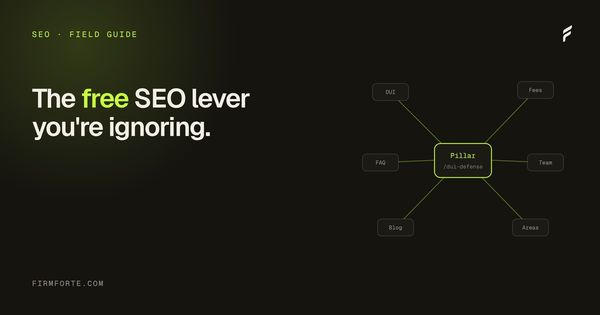
For a law firm site, the structure that consistently outperforms is hub-and-spoke.
One pillar page per practice area is the hub. The hub is a long, substantive page (2,000 words minimum) that covers the practice area broadly. Topic-specific pages are the spokes. Each spoke covers one narrow question or sub-topic in depth. The hub links down to every spoke. Every spoke links up to the hub. Spokes that share themes link laterally to each other.
What that looks like for a personal injury practice:
HUB
└── /personal-injury/             (2,500-word pillar page)
    │
    SPOKES
    ├── /personal-injury/car-accidents/
    ├── /personal-injury/slip-and-fall/
    ├── /personal-injury/wrongful-death/
    ├── /personal-injury/medical-malpractice/
    └── /personal-injury/dog-bites/
    │
    SUB-SPOKES (one or two levels deeper)
    ├── /personal-injury/car-accidents/whiplash-settlement-amount/
    ├── /personal-injury/car-accidents/uninsured-motorist/
    ├── /personal-injury/car-accidents/passenger-claims/
    └── /personal-injury/slip-and-fall/grocery-store/
Links flow like this:
- The hub links down to all five spokes (in the body, not just a sidebar)
- Each spoke links back up to the hub at least twice in the body content
- Each spoke links laterally to one or two related spokes
- Each sub-spoke links up to its parent spoke and to the hub
- Blog posts about personal injury topics link into the relevant spoke, not just the hub
Done this way, every URL in the tree is reachable in 2 clicks from the hub. The hub itself gets 5-plus inbound contextual links from spokes and many more from sub-spokes. Authority concentrates on the hub, which is exactly the page you want to rank.
A site with three practice areas done this way has roughly 35 to 50 internal contextual links between practice-related pages. Most law firm sites we audit have 3 or 4.
The five anchor text mistakes
Anchor text is the single highest-signal element of an internal link. Get it wrong and the link contributes nothing topically. Get it right and you compound authority on the target.
Five common patterns to stop using, with before-and-after examples.
One: "Click here" and "Learn more." The most expensive mistake because the link tells the engine nothing about the target.
Bad: "If you've been injured in a car accident in Texas, learn more about your options."
Good: "If you've been injured in a Texas car accident, the statute of limitations is two years from the date of injury."
Two: the firm name as anchor for everything.
Bad: "Adams Park Personal Injury handles claims across Travis County."
Good: "Our personal injury practice handles claims across Travis County."
The first version trains the engine to associate the firm name with every page rather than the practice area. The second version tells the engine the target page is about personal injury.
Three: identical anchor to multiple targets.
If three different pages on your site each link with the anchor "personal injury attorney" but point to different URLs, the engine has no way to know which target is canonical. Pick one canonical URL for that anchor, point everything that uses it there, and use varied phrasing for the other targets.
Four: anchor text mismatching the target page's H1.
Bad: anchor text "car accident lawyer," target page H1 "Auto Collision Practice"
Good: anchor text "car accident lawyer," target page H1 "Texas Car Accident Lawyer"
The engine reconciles anchor text with the target's on-page signals. Big gaps signal confusion.
Five: over-linking the same page.
If your homepage links to the contact page 12 times with the anchor "Free Consultation," the engine starts to discount the signal. Two or three contextual links per page is the natural ceiling. More than that reads as spam patterns.
Contextual links versus navigation links
Internal links fall into two categories with materially different weight.
Navigation links appear on every page (the main menu, footer, sidebar). They count, but search engines have learned to discount them. Their placement isn't a fresh editorial decision; it's structural. Every page on the site has the same nav.
Contextual links appear inside the body content, where someone (you) chose to link a specific phrase to a specific page. These carry meaningfully more weight because they signal editorial judgment about what's actually relevant.
Every page you care about ranking needs at least 5 contextual internal links pointing to it, from related body content on other pages. Not navigation links. Real prose links from articles and pages that discuss the same topic.
Most law firm sites we audit have zero contextual internal links between any of their practice-area pages. The pages exist in isolation, connected only by the nav menu, which Google treats as low-signal.
A worked paragraph rewrite
A real example of how a single paragraph on a hub page should change.
Bad version (one link, generic anchor):
"Our personal injury practice covers a range of cases including car accidents, slip and fall, wrongful death, and medical malpractice. Read more about our services."
Good version (five contextual links, topic-named anchors):
"Our personal injury practice handles Texas car accidents, slip and fall cases, wrongful death claims, and medical malpractice litigation. Each carries different rules around statutes of limitations and damages caps, covered in the practice-specific pages."
Same firm, same information, same paragraph length. Five inbound contextual links instead of one generic one. Multiply this across 50 pages and the topical signal compounds quickly.
The Saturday-morning playbook
The pattern that produces visible results within 30 days:
Pick your top three practice areas. Open the hub page for each in a tab. Open every related spoke and sub-spoke in tabs. Open every blog post tagged to those practices in tabs. That's probably 15 to 30 tabs.
Then walk through them, one at a time, doing four things:
- Every time the page mentions a related topic that has its own URL, add a contextual link to that URL with topic-relevant anchor text.
- Every spoke and sub-spoke page should link back up to its hub at least twice in the body content, not just in the breadcrumb.
- Every blog post on a topic should link to the relevant spoke or sub-spoke once in the first half of the post and once in the last paragraph.
- Remove "click here" and "learn more" anchors. Replace them with topic-named anchors.
An hour per practice area, done in one focused sitting. Three practice areas in one Saturday morning. We've seen this single exercise lift rankings two to four positions on competitive keywords within 30 days. The site doesn't need new content, new backlinks, or new schema. Just the existing content connected the way Google expects.
The Screaming Frog audit
Free tool, free version handles up to 500 URLs (plenty for any law firm site). Three reports to run:
Internal Inbound Links per URL. Look for pages with fewer than 3 internal inbound links. Those are orphan or near-orphan pages, and they're not ranking, regardless of how well-written they are.
Anchor Text by Target URL. Look at the anchor text distribution to your top pages. Healthy distributions have variety: the target page's primary keyword anchor appears 30 to 50% of the time, with related variants and brand-name anchors filling the rest. Distributions that are 90% identical anchor text or 90% "click here" need a fix.
Crawl Depth. Look for pages more than 3 clicks from the homepage. Those pages are getting starved of authority. If they're important pages, link directly to them from a closer page (the hub, or a sub-spoke).
The whole audit takes one focused afternoon. Cataloguing fixes and applying them adds another two. So roughly a full day to fix three months of agency work. Most law firm sites pay agencies $5,000 a month for less than this.
What's compounding here
The reason internal linking works disproportionately on law firm sites: most of the competition isn't doing it. The agencies that charge five figures a month don't include internal linking in their workflow because it's labor that doesn't produce reportable metrics. They focus on things they can ship (blog posts, backlink outreach, schema markup) and skip the unglamorous structural work.
A law firm partner spending one Saturday morning doing internal linking properly is doing more for rankings than the agency did in six months. After 12 months of disciplined hub-and-spoke linking on a content base that doesn't even need to grow, the firm site usually outranks competitors in the same metro who are paying double the marketing budget.
The Atlanta firm I audited three years ago still ranks page one for their target keywords. They never hired another agency. They never bought a single backlink. They linked their pages together properly and let the site do its work.